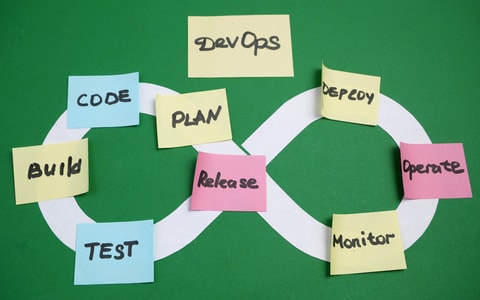
The inefficient silos dividing software developers and IT specialists have long gone out of style as companies embrace development operations (DevOps), a framework promoting practices and tools that facilitate collaboration between software development and IT support teams. Smaller, faster and more frequent software updates are the new norm through continuous integration (CI) — automating the process of centralizing code changes in a single repository — and continuous delivery (CD) — automating the process of releasing code changes to users.
Top DevOps Tools
- Slack
- GitHub
- Jenkins
- Docker
- Kubernetes
But DevOps is not a one-size-fits-all solution, requiring teams to make thoughtful choices when selecting tools to upgrade their tech stacks. Here are a few tips for determining the ideal DevOps tools for any organization, along with a list of some of the most popular offerings for coding, collaboration, continuous integration and more.
Top DevOps Tools

Type: Collaboration
Key Features: Channels and threads; automated workflows; integrations with more than 2,600 applications.
Uses: Real-time alerts and deployment announcements; code reviews; automated workflows for IT support requests.
Slack is a communications platform that allows companies to organize conversations through channels and message threads. Engineers can use specific channels to send real-time alerts, share documentation, conduct code reviews and announce software deployments. Meanwhile, IT specialists can design automated workflows to accelerate processes, such as creating a message template for submitting IT requests.
Type: Coding
Key Features: GitHub Copilot agent; security features that track data leaks; dashboards for reviewing project tasks and problems.
Uses: Safely storing code repositories; automating work to reduce backlogs; shipping high-quality code releases.
GitHub is a cloud platform that software developers use to store and share their code repositories. Developers can delegate tasks and issues for coding projects while selecting from a slate of large language models (LLMs) to tailor GitHub’s AI agent, GitHub Copilot, to their needs and automate various workflows. The platform also offers advanced security features, such as scanning for code errors and data leaks.

Type: CI/CD
Key Features: Compatibility with macOS, Windows, Linux and Unix-like systems; hundreds of plugins; option to scale from a CI server to a CD hub.
Uses: Automating code tests; automatically implementing code changes; releasing software updates.
Jenkins is an open-source server that enables users to automate software development and deployment. It can be quickly downloaded from the Jenkins site for Linux, macOS, Windows and Unix-like operating systems. Once installed, developers can customize it with hundreds of available plugins, and there’s the option to extend Jenkins from a CI server into a CD tool to scale it for more intensive projects.
Type: Containerization
Key Features: AI agent called Gordon; Kubernetes tools; debugging program.
Uses: Creating containers; analyzing context of containers; identifying ways to improve container management.
Docker is an open-source platform that specializes in creating containers, or software packages that contain the code, libraries and other minimum dependencies needed to run the software. The desktop version provides a command-line interface (CLI), Kubernetes support and debugging tools — all of which help manage and ship containers. An AI agent named Gordon can also automate tasks and offer suggestions after analyzing containers.

Type: Containerization
Key Features: Mutable pods; automatic updates and rollbacks; on-premises, hybrid and public cloud support.
Uses: Managing containers; deploying software updates; scaling applications.
Kubernetes is an open-source automation system that groups one or more containers into pods, distributing shared storage and network resources across the linked containers. In this setup, it rolls out updates by replacing old pods with new pods rather than changing the actual containers. Kubernetes can then quickly roll out and roll back updates, manage CI workloads and scale applications with basic commands. Users can also choose between on-premises, hybrid or public cloud providers to run Kubernetes.
Type: CI/CD
Key Features: Management console and CLI; event notifications; third-party and pre-built plugins; access management controls.
Uses: Establishing software release pipelines; continuously releasing and refining software updates; managing access to workflows.
AWS CodePipeline is an Amazon service that facilitates continuous integration and delivery. Teams can use Amazon Web Services’ management console or CLI to map out their software release process, adding plugins at any stage as needed. They can then quickly release updates, test the changes and patch bugs, while setting access controls and timely notifications to keep their workflows and pipelines secure.
Type: Monitoring
Key Features: Code quality and open-source library analyses; internal developer portal; CI/CD pipeline visibility.
Uses: Patching code errors; identifying high-risk open-source libraries; shipping software updates; securing CI/CD processes.
Datadog is a cloud-based security platform that monitors software at each stage of development. It can review and evaluate code quality, recommend bug patches and flag vulnerabilities in open-source libraries. Once developers clean up their code and pick the ideal libraries, they can use Datadog’s internal developer portal to collectively review data insights, establish guardrails and ship software releases.

Type: Configuration Management
Key Features: Control and command center; playbooks for storing solutions; testing frameworks like Test Kitchen and Molecule.
Uses: Establishing and managing developer workflows; testing code; rolling out software updates.
Owned by IBM subsidiary Red Hat, Ansible is an open-source platform that automates the main aspects of continuous integration and delivery. Teams can manage workflows and integrations in the platform’s command center, with individuals storing their workflows in “playbooks” that others can view and edit. Ansible uses frameworks like Test Kitchen and Molecule to test code as well, enabling developers to roll out timely software updates.

Type: Monitoring
Key Features: Customizable dashboards; metrics, logs, traces and profiles; alerting and incident response; OpenTelemetry support.
Uses: Monitoring applications and infrastructure; identifying and troubleshooting software issues; managing incidents and system performance.
Grafana Labs is an open-source platform that helps development and operations teams monitor their applications, infrastructure and other systems. The system brings metrics, logs, traces and other telemetry data into customizable dashboards, giving teams a centralized view of system performance. Developers can also use Grafana’s alerting and incident response tools to identify problems, investigate their root causes and resolve issues, while integrations with tools such as Prometheus and OpenTelemetry allow teams to connect their existing data sources without having to migrate them.

Type: Infrastructure as Code
Key Features: Configuration files; reusable templates; automated deployments; Google Cloud resource management.
Uses: Automating infrastructure deployments; managing cloud resources; creating repeatable development environments.
Google Cloud Deployment Manager is an infrastructure automation service that allows developers to create and manage Google Cloud resources through configuration files. Teams can define the infrastructure they need and use reusable templates to deploy and update resources consistently across projects. Deployment Manager then automates the process of provisioning those resources, helping users reduce manual configuration and create repeatable environments for applications.
How to Choose the Right DevOps Tools
There are several factors teams can use to identify the DevOps tools that make the most sense for their organizations and tech stacks:
Level of Expertise
Some tools are more complex than others. Teams that lack extensive software knowledge and resources for upskilling programs may want to settle for simpler offerings designed to be accessible to users of less technical backgrounds.
Integration Requirements
Check what other products and platforms are compatible with a DevOps tool before committing. A tool that can easily integrate with a team’s existing messaging platforms, automation tools and other applications can avoid the headaches of realigning a tech stack.
Range of Capabilities
While some products are tailored to specific tasks or workflows, others cover multiple aspects of software development and IT support. Teams may want to double-check that a tool’s capabilities don’t overlap too much with others they’re already using.
Pricing Details
Review the pricing details and licensing terms. Although a DevOps tool may start at an affordable rate, scaling it can trigger pricing or licensing changes that make it difficult to tailor it to evolving operational needs.
Related Articles
Frequently Asked Questions
What are DevOps tools used for?
DevOps tools automate various stages of software development, with the goal of better connecting software developers and IT specialists. For instance, they can automate code reviews and tests, send alerts on infrastructure vulnerabilities and orchestrate the actions of AI agents to automate entire workflows.
Which DevOps tools are best for beginners?
Those just getting started with DevOps tools may want to consider offerings that lean heavily on basic syntax and automation, requiring less technical expertise. Examples include Ansible, GitHub and Docker.
What should you look for in DevOps tools?
Here are a few factors companies must consider before investing in DevOps tools:
- Technical Expertise: If teams lack in-depth software expertise, investing in simpler tools for beginners will likely be more effective.
- Integration Needs: DevOps tools that are already compatible with a team’s existing tech stack can avoid extra costs and logistical challenges.
- Scope Overlap: Tools with similar capabilities are redundant and a waste of resources, so be sure to avoid overlap as much as possible.
- Pricing Conditions: Read the fine print to ensure that scaling a DevOps tool doesn’t come with additional costs or licensing terms.
DevOps tools vs. platform engineering tools
DevOps tools focus on automating different aspects of software development and deployment, working more with the underlying infrastructure on the backend. Meanwhile, platform engineering tools fulfill more front-end functions, building internal developer platforms that let developers interact with the underlying infrastructure via user-friendly interfaces. As a result, both types of tools complement each other.